 Framing
MatGlass
See the finished piece before you decide on framing.
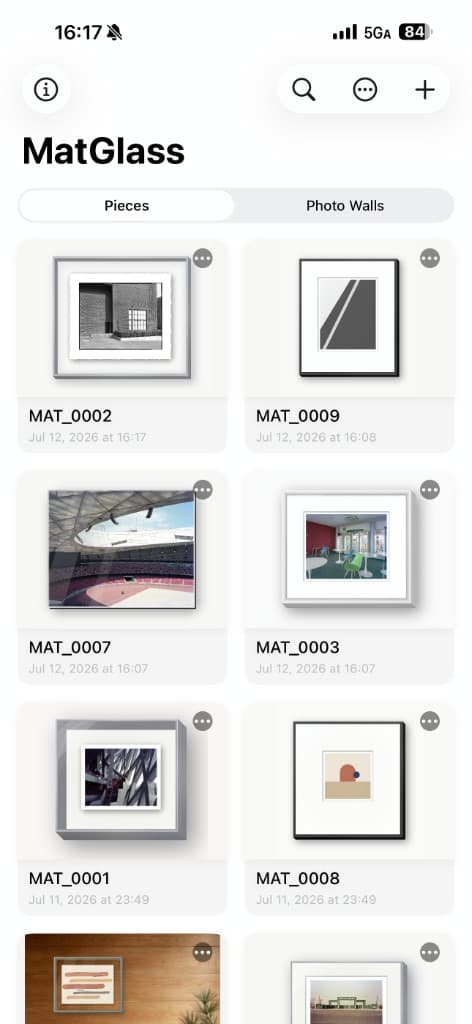
A professional framing preview tool. Import a photo and see the finished frame, mat, glass and wall before you cut anything or place an order.
By ArgentGlass Lab · iOS
What it is
MatGlass is a professional framing preview tool for photo enthusiasts, artists and framing professionals. It tackles the most common — and most expensive — problem in framing: before you actually cut the mat or order the frame, it is hard to be sure what frame this photo needs, how wide the borders should be, which glass to use, and which wall it should hang on.
Import a photo and fully simulate the real framing structure in a digital environment — outer frame, mat, glass, mounting style and wall scene — adjusting in real time and comparing instantly. It turns ‘that feels right’ into a plan you can see, then hand to a frame shop or make yourself with confidence.
The problem it solves
Many people choose a frame by instinct or a shop assistant's suggestion, only to hang it and find the mat too narrow, the frame colour too loud, the glass reflective, or the size out of proportion with the wall. Redoing it costs time and materials.
MatGlass turns framing from ‘ordering on a hunch’ into ‘preview, then decide’: as if standing at a professional framing bench, you can try frame stock and borders again and again, check the result against real wall colours or even a photo of your own room, and export the specs only once you are happy.
Core capabilities
Real framing structure
Rather than simply adding a border to a photo, MatGlass models the real framing layers: outer frame → mat (optionally several layers) → artwork → glass. Different mounting styles differ fundamentally in structure, spacing and appearance, so a built-in framing guide helps you understand mat framing, borderless, white-border, flush-mount, float, edge-wrap, shadow box and glass-sandwich mounting, and choose to suit the work.
A rich range of frame materials and profiles
Covering wood (oak, walnut, cherry, pine, mahogany, teak and more), metal (black, gold, silver, rose gold, bronze), ornate classical (Baroque, Victorian, Florentine, Louis XV, Gothic), modern matte and Eastern materials (rosewood, red sandalwood, bamboo, rattan). You can also adjust the frame profile (flat, bevel, scoop, ogee, stacked double) so the preview comes closer to the real thing.
Mats and window details
Single, double or triple mats, with adjustable margins and a weighted bottom. Window openings can be rectangular, oval, Roman arch or Gothic arch. Surfaces include linen, kraft, cotton, woven and embossed, plus suede, silk, leather, gold-fleck and marble textures, and you can add decorative lines such as a gold line, double line or French wash. Museum, Eastern and French classic styles are a tap away.
Glass and protection
Regular glass, UV glass, museum glass, anti-glare glass, acrylic, or no glass at all. Each type's reflection and protective character is reflected in the preview, so you can choose for the display environment.
Wall scenes and custom backgrounds
A range of preset wall colours, or use a photo of your own living room, study or gallery wall as the background, to see whether the framing sits well in a real space.
Gallery walls (several pieces together)
Combine several framed works on one wall, adjust the spacing and layout templates, and preview the grouped display — ideal for exhibition layouts, planning a home wall, or presenting a series as a whole.
AR preview in real space
Use augmented reality to place a single piece or a whole group on a real wall, and check the actual size, proportion and hanging position — reducing the ‘looked small on screen, too big on the wall’ gap.
Multi-window mats and signatures
Diptych, triptych and grid multi-opening compositions are supported. Add a handwritten or text signature and inscription, and customise each window individually in a multi-window layout.
Smart colour matching
Analyse the photo's colours and generate a coordinated mat, frame and wall set in one tap — a quick starting point you can then fine-tune.
Professional export and delivery
From design to the wall, MatGlass carries the plan through to delivery:
- Export a high-resolution framing preview image
- Export a framing spec PDF ready for the frame shop
- Generate a hanging-hook coordinate / installation guide PDF (including gallery walls)
- Save the whole setup as a preset (.matpreset), apply it to other works or share it with colleagues and clients
Who it's for
- Photo enthusiasts: settle on frame and borders before printing, and avoid the wrong size or style
- Artists and illustrators: prepare a consistent, professional framing presentation for exhibition or sale
- Interiors and display: plan gallery-wall proportions, spacing and the relationship to the wall
- Frame shops and designers: discuss options with clients, compare variants and output spec sheets
The idea behind it
The name MatGlass comes from the two most important elements in framing: the Mat and the Glass. They decide how a work is held and protected, and the impression a viewer takes in at first glance.
The reason for making this app is simple: when framing our own photos, we wanted to see how different frames and mats would pair up in advance, rather than buying the wrong thing and regretting it. We wanted to hand that ‘preview, then decide’ ability to everyone who takes the presentation of their work seriously.
MatGlass — a professional framing preview tool: see the finished frame, mat, glass and wall before you order or start, and bring the plan into the room and to delivery with AR, gallery walls and PDF specs.
Download on the App Store